The Feature That Makes IPTV Feel Like Real TV
You subscribe to an IPTV service. You get 10,000+ channels. But without one key feature, you're essentially flying blind — scrolling endlessly through a blank list, with no idea what's on, what just started, or what's coming next.
That feature is EPG — the Electronic Program Guide.
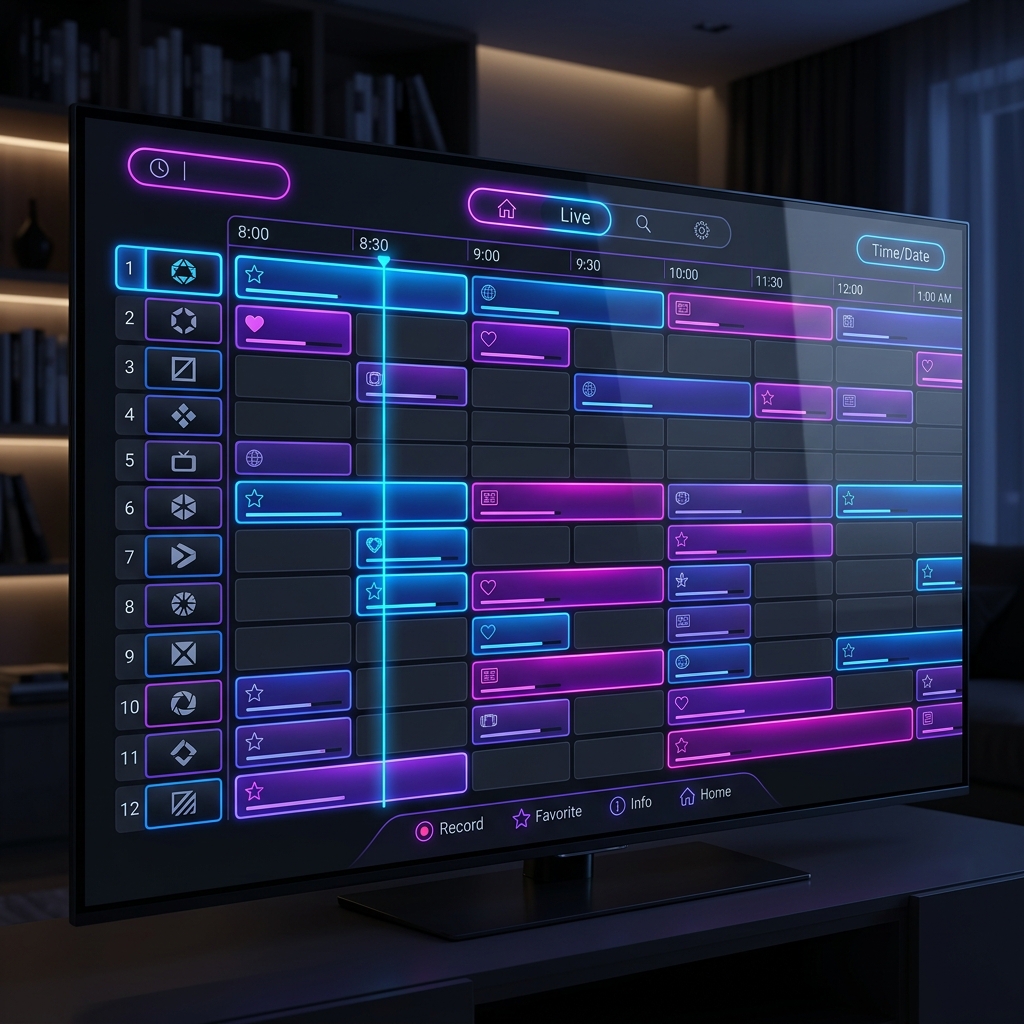
EPG is the TV schedule inside your IPTV player. It shows you what's playing now, what's coming next, and the full weekly program lineup for each channel. Think of it as a digital TV guide or a list with all the information you need, fully integrated into your IPTV app.
In 2026, EPG isn't optional — it's the difference between an IPTV setup that feels like a professional TV experience and one that feels unfinished. This guide covers everything: what EPG is, how it works, how to enable it in every major app, and how to fix the most common problems.
💡 New to IPTV? Start with our Complete Beginner's Guide to IPTV before diving into EPG setup.
📹 Watch: How to Set Up EPG on TiviMate — Step by Step
🎬 Add Playlist and EPG to TiViMate (YouTube)
The clearest hands-on tutorial for adding a custom EPG source to TiviMate — covers both M3U and XMLTV setup.
What Exactly Is EPG?
🔑 Key Takeaways (Quick Answer)
- EPG = Electronic Program Guide — the on-screen TV schedule built into your IPTV app
- It shows current programs, upcoming shows, descriptions, and times for every channel
- Data is delivered in XMLTV format and fetched from your provider's server
- Over 78% of cord-cutters say a built-in program guide is one of the most important features they look for in an IPTV player
- SWC-STREAM includes EPG automatically — no extra setup needed with Xtream Codes login
EPG in Plain Terms
EPG stands for Electronic Program Guide — an on-screen, digital schedule that shows what's currently playing and what's coming up next on TV channels or streaming services. It replaced the printed TV guide and now appears on cable boxes, satellite receivers, smart TVs, and nearly every streaming or IPTV app you use today. If you've ever pressed the "Guide" button on your remote and seen a grid of channels with show titles and times, you've used an EPG.
With EPG enabled on your IPTV subscription, the experience changes entirely. You see a grid layout — just like the guide on a cable TV box — showing every channel, what is on right now, what aired before, and what is scheduled for the next several hours or days. You can browse by time, by category, by channel, or search for a specific programme.
How Does EPG Work Behind the Scenes?
Understanding how EPG works helps you fix it when something goes wrong.
Step 1: Your provider generates the EPG data
Your IPTV provider aggregates programme schedule data from broadcasters, third-party EPG data services, and direct channel feeds. This data is formatted in XMLTV format — the industry standard for IPTV programme guide data.
Step 2: The data is stored and updated on the provider's server
Providers typically refresh EPG data every 24 hours, with some updating every six hours for sports-heavy schedules. The EPG file is fetched over HTTP/HTTPS, parsed by the player, and cached locally for a period — typically 12 to 24 hours.
Step 3: Your IPTV app downloads and displays it
It fetches an XMLTV file or an EPG URL from your provider that contains all channel schedules, program titles, and metadata. Using tags like tvg-id, the app links each channel in your playlist to the correct program list and converts all timestamps to your local time.
The 4 Types of EPG You'll See in IPTV Apps
In IPTV, these four types are the ones you'll encounter most often:
| Type | What It Looks Like | Best For |
|---|---|---|
| Grid (Timeline) EPG | Cable-style horizontal timeline — channels in rows, times in columns | Browsing multiple channels at once |
| Vertical (List) EPG | Channel list on one side, program details on the other | Remote-friendly navigation |
| Minimal EPG ("Now & Next") | Only current + next program shown | Quick info without opening a full guide |
| Advanced EPG with Metadata | Full descriptions, thumbnails, episode info | Power users wanting full details |
✅ TiviMate uses the Grid EPG — widely considered the best IPTV EPG experience available in 2026.
EPG vs. M3U — What's the Difference?
This is one of the most common points of confusion for new IPTV users.
M3U is the playlist file that contains the list of channels and their stream links. EPG is the program guide that adds scheduling information on top of those channels. Both work together — M3U tells your app what channels exist, while EPG tells it what's playing on them and when.
📖 Related: M3U vs Xtream Codes — What's the Difference?
How to Set Up EPG in Every Major IPTV App
⭐ Method 1: TiviMate (Recommended)
TiviMate is widely regarded as the best IPTV app for EPG in 2026. Here's how to set it up:
- Open TiviMate → tap the menu icon (top left) → Settings
- Go to Playlists → [Your Playlist] → EPG Source
- Paste your EPG URL (XMLTV format — provided by SWC-STREAM)
- Set EPG Refresh Interval to every 12–24 hours (avoid setting it lower than 6 hours)
- Return to the main screen and wait 2–5 minutes for the EPG to populate
- Navigate to any channel and press the right arrow — you'll see the full program guide
🔧 Pro Tip: Under EPG URL, paste the EPG URL from your activation email (XMLTV format). Under EPG Refresh, set to "After midnight" — this prevents EPG updates from interrupting your viewing.
🎬 Full TiviMate Setup Guide — EPG, Playlists & Best Settings (YouTube)
Method 2: IPTV Smarters Pro
Open IPTV Smarters Pro and log in with your IPTV credentials. Go to Settings (gear icon) from the home screen. Select EPG Settings. Toggle Load EPG to ON. If your provider didn't include EPG, you can add an external EPG URL under EPG URL. Go back and select Force EPG Update. Restart the app. The TV guide should now appear.
⚠️ Note: IPTV Smarters Pro only supports one EPG source at a time. For multiple sources, use TiviMate.
Method 3: Smart IPTV (Samsung & LG TVs)
In Smart IPTV, the EPG URL field is listed directly on the settings page. Enter your XMLTV URL there and save. The guide will load automatically after restarting the app.
📖 Related: Best IPTV App for Smart TV — Top 7 Picks
Method 4: GSE Smart IPTV (Apple TV / iPhone)
- Open GSE Smart IPTV → go to Settings → Remote Playlists
- Tap your playlist → Edit
- In the EPG URL field, paste your XMLTV link
- Save and restart — the guide loads within 2–3 minutes
SWC-STREAM and EPG — What You Get Automatically
With a SWC-STREAM subscription, EPG is included automatically when you connect via Xtream Codes:
- ✅ Full program guide for all channels
- ✅ 7-day schedule displayed ahead
- ✅ Catch-up TV support (available on select channels)
- ✅ Auto-updates every 24 hours
- ✅ No manual EPG URL needed — it loads with your playlist
If you connected via M3U and EPG isn't showing, simply contact our support team — we'll provide your personalized XMLTV URL in minutes.
🚀 Start your free SWC-STREAM trial — EPG included from day one.
Troubleshooting: Fix EPG Issues in 5 Minutes
❌ Problem 1: EPG shows "No Information"
If the guide shows "No Information" after you have added an EPG source, work through this checklist: Confirm the EPG URL is set in Settings → Playlists → EPG Source. Tap "Update EPG" and wait 3–5 minutes (large EPG files with thousands of channels can take time).
❌ Problem 2: Program times are wrong (off by several hours)
If the EPG loads and shows programme data, but the times are off by a few hours, your time zone offset needs adjusting. This happens frequently when a provider's EPG is set to UTC and your device is in a different region. In TiviMate, go to Settings > EPG > Time Offset and adjust by increments of one hour until the displayed times match your local clock.
❌ Problem 3: EPG works on some channels but not others
The channels without EPG have IDs in your M3U playlist that do not match the EPG source. This is a provider-side issue. You can fix individual channels in TiviMate Premium using channel mapping, or contact your provider and ask if they have a matching EPG URL for their specific channel IDs.
❌ Problem 4: EPG was working but suddenly stopped
Clear EPG cache: In TiviMate, go to Settings > EPG > Clear EPG Cache. In IPTV Smarters, go to Settings > Clear Cache. Force EPG update: Most apps allow you to manually trigger an EPG update. Restart the app: Sometimes a simple restart is all it takes to reload EPG data properly.
EPG Troubleshooting Checklist
| Issue | Fix |
|---|---|
| "No Information" on all channels | Check EPG URL is correctly entered → Force Update |
| Times wrong by X hours | Adjust Time Offset in EPG settings |
| EPG loads but some channels missing | Channel ID mismatch — contact your provider |
| EPG suddenly stopped working | Clear cache → Force update → Restart app |
| EPG loads very slowly | Normal on first setup — large XMLTV files can take 5–10 min |
Frequently Asked Questions
Does EPG cost extra with SWC-STREAM?
No — EPG is included in every SWC-STREAM subscription at no extra cost.
What format does EPG use?
XMLTV is the most widely used EPG format in the broadcast and IPTV world. It's an XML-based format where each program entry includes a start time, stop time, channel ID, title, description, and optional fields like category, episode number, rating, and icon (poster image).
Why does EPG take a few minutes to load after setup?
The EPG file is fetched over HTTP/HTTPS, parsed by the player, and cached locally. Large files with thousands of channels can take several minutes to download and process on the first load.
How often should I update my EPG?
Every 4–6 hours is ideal. Don't over-update — updating every 1–2 hours wastes bandwidth and may get your IP blocked. Updating every 24+ hours leaves you with stale guide data.
Which app has the best EPG in 2026?
TiviMate is widely regarded as the best IPTV app for EPG in 2026 — it offers a polished cable-TV-style grid, catch-up support, 7-day schedule view, and excellent channel matching tools. See our full Best IPTV App for Smart TV guide for the complete comparison.
Can I use EPG on my Samsung or LG TV?
Yes — apps like Smart IPTV, IBO Player, and Hot IPTV Player all support EPG natively on Samsung and LG TVs. See our Android Box & Smart TV setup guide for step-by-step instructions.
Conclusion: EPG Is What Makes IPTV Feel Complete
Without EPG, IPTV is just a list of channels. With it, you have a full TV experience — schedules, descriptions, catch-up, reminders, and effortless navigation across thousands of channels.
Industry data suggests that IPTV users without EPG churn at rates approximately 35% higher than those with a functional guide. In other words, a working EPG isn't just a nice-to-have — it's what keeps people genuinely satisfied with their IPTV service.
With SWC-STREAM, EPG is built in from day one. No extra configuration, no hunting for XMLTV URLs — just a complete TV guide waiting for you when you log in.
🚀 Start your free SWC-STREAM trial today — full EPG included, no credit card required.
Tags: what is EPG IPTV, electronic program guide setup, EPG TiviMate 2026, IPTV TV guide, XMLTV explained, EPG IPTV Smarters, SWC-STREAM EPG, how to fix EPG IPTV, EPG not showing
